
Coming soon: Parent form fields driven logic for conditions in table fields
If you’ve built complex forms on Kissflow, you know that tables are powerful, but they have been a bit fenced in.
Until now, table logic has been isolated. Referencing parent fields (that is, fields in your form's sections) in table fields’ conditions, such as visibility and validation rules, requires workarounds. For example, to show specific columns (like From city) based on a parent field selection (like Travel), you have to create redundant helper columns inside the table to bridge the data. This often resulted in cluttered UIs.
That changes with our upcoming release. We are tearing down the wall between parent and table fields.
The solution: Context-aware tables
With this update, you can drive table logic directly from parent form fields. No workarounds are required.
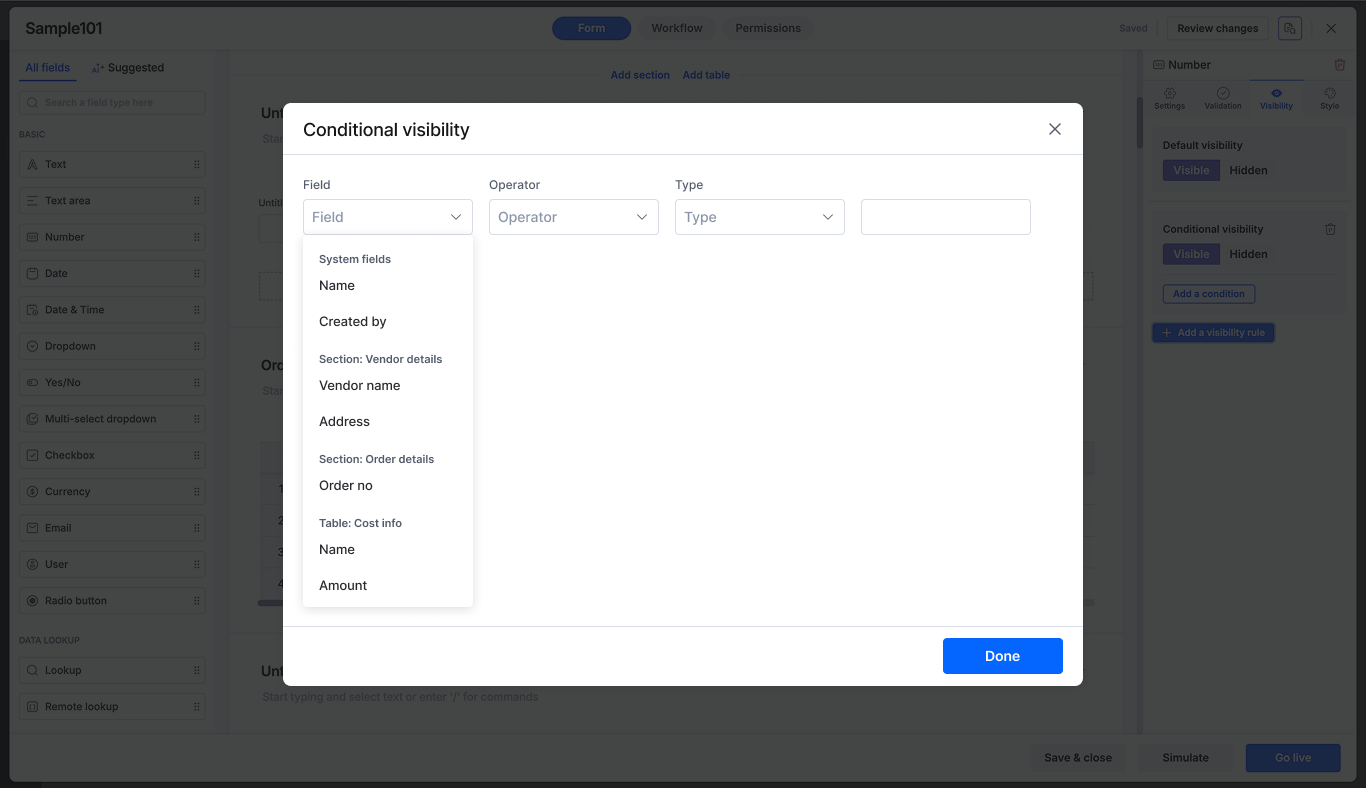
For example: Show From city columns only when the parent dropdown field Expense type is Travel, make Restaurant name mandatory only when the parent field is Food, and so on.
Availability and release
This update is available to users on all Kissflow plans and allows you to use parent form fields in the following logic areas within a table:
Conditional visibility: Show/hide columns.
Conditional validation: Custom error logic.
Conditional required: Toggle required fields dynamically.
Filters: Reference parent fields in filter conditions for Lookup, Dropdown, Radio, User, and Aggregate fields.
Remote lookup configuration: Pass parent field values into API parameters of table fields.
You can expect this functionality to be live in the first week of February. Stay tuned!
Content aside
-
13
Likes
- 8 mths agoLast active
- 204Views
-
5
Following