
New in Kissflow Apps: New variable types with updated limits
What's new?
We are thrilled to introduce three new variable types for JSON variables across apps:
- Object
- Array of objects
- Array of strings
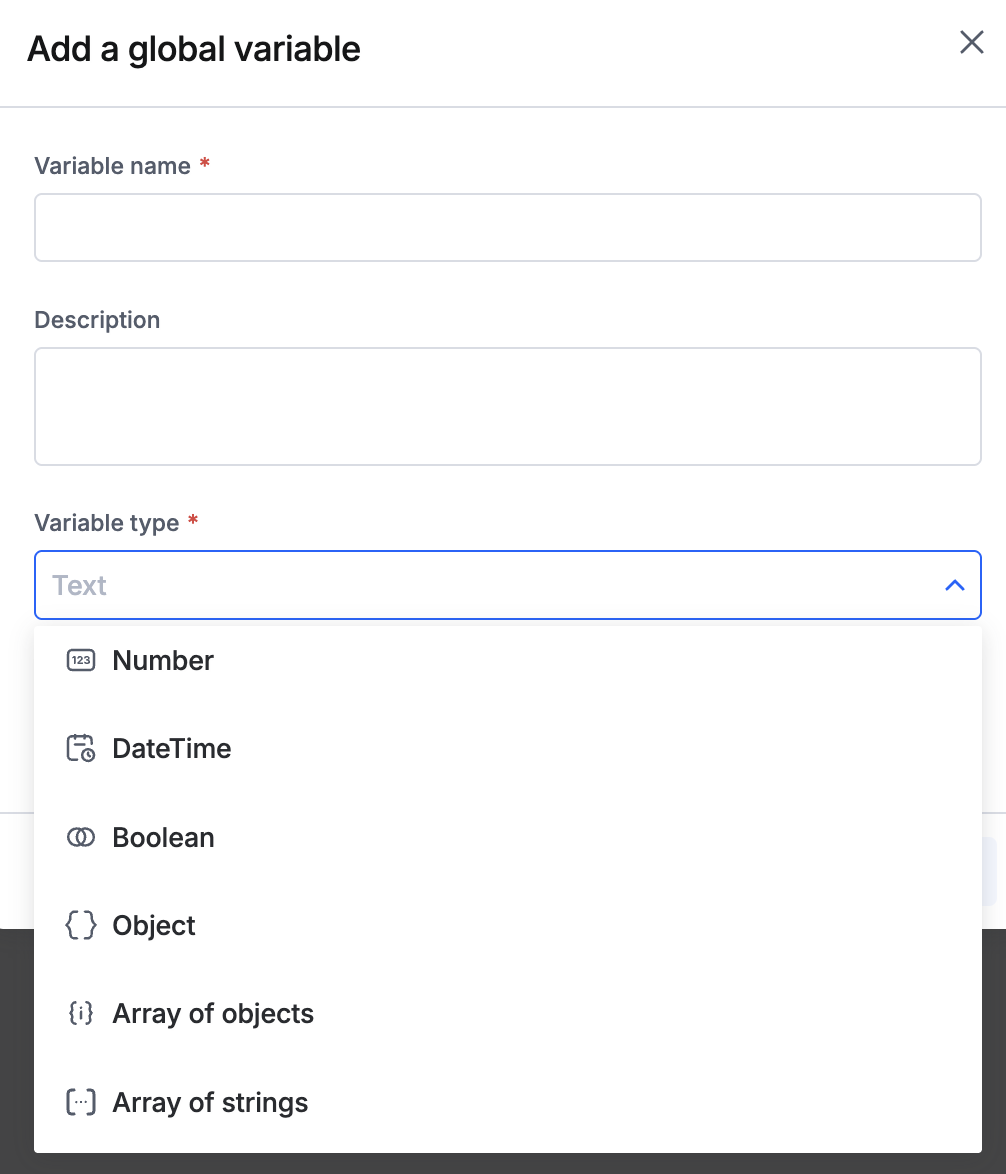
What has changed?
In addition, we have implemented new limits for JSON variable data and schema in to ensure system stability and better performance. Now, the following limits apply to new and existing JSON variables in Kissflow Apps across all environments.
Limits for variable type: Object
Root object keys: 100 maximum (top level)
Nesting depth: 2 levels
Nested object keys in level 1: 20 maximum
Nested object keys in level 2: 10 maximum
Array items: 10 per array
Array item object keys: 10 per array
Example JSON for object
{
  "orderId": "po1001",
  "productName": "Laptop",
  "category": "Electronics",
  "quantity": 5,
  "status": "active",
  "createdAt": "2026-01-15T10:30:00Z",
  "customer": {
    "customerId": "cust001",
    "name": "Alice Johnson",
    "email": "alice@example.com",
    "phone": "555-1234",
    "address": {
      "street": "123 Main St",
      "city": "New York",
      "zip": "10001"
    }
  },
  "payment": {
    "method": "credit_card",
    "amount": 4999.95,
    "currency": "USD",
    "status": "paid"
  },
  "tags": ["priority", "fragile", "express"]
}
Limits for variable type: Array of objects
Root array items: 100 maximum
Nesting depth: 3 levels
Nested object keys in level 1: 30 maximum
Nested object keys in level 2: 20 maximum
Nested object keys in level 3: 10 maximum
Array items: 10 per array
Array item object keys: 10 per array
Example JSON for array of objects
[
{
"orderId": "po1001",
"customer": {
"customerId": "cust001",
"name": "Alice Johnson",
"email": "alice@example.com",
"phone": "555-1234",
"address": {
"street": "123 Main St",
"city": "New York",
"state": "NY",
"zip": "10001",
"country": "US"
}
},
"items": [
{
"itemId": "item001",
"productName": "Laptop",
"quantity": 2,
"unitPrice": 999.99,
"discount": 50.00
},
{
"itemId": "item002",
"productName": "Mouse",
"quantity": 3,
"unitPrice": 29.99,
"discount": 0
}
],
"status": "shipped",
"createdAt": "2026-01-15T10:30:00Z",
"updatedAt": "2026-01-16T08:00:00Z",
"totalAmount": 2039.95,
"currency": "USD",
"paymentMethod": "credit_card",
"notes": "Handle with care",
"tags": ["priority", "fragile"]
},
{
"orderId": "po1002",
"customer": {
"customerId": "cust002",
"name": "Bob Smith",
"email": "bob@example.com",
"phone": "555-5678",
"address": {
"street": "456 Oak Ave",
"city": "Los Angeles",
"state": "CA",
"zip": "90001",
"country": "US"
}
},
"items": [
{
"itemId": "item003",
"productName": "Monitor",
"quantity": 1,
"unitPrice": 349.99,
"discount": 20.00
},
{
"itemId": "item004",
"productName": "Keyboard",
"quantity": 1,
"unitPrice": 79.99,
"discount": 0
}
],
"status": "pending",
"createdAt": "2026-02-10T14:00:00Z",
"updatedAt": "2026-02-10T14:00:00Z",
"totalAmount": 409.98,
"currency": "USD",
"paymentMethod": "paypal",
"notes": "",
"tags": ["standard"]
}
]
Limits for variable type: Array of strings
Root array items: 30 maximum
Example JSON for array of strings
["electronics", "clothing", "furniture", "sports", "books"]What this means for you
As previously notified here, the new variable limits will affect your existing JSON variable data.
We recommend auditing and editing your JSON variable data to comply with these limits to avoid disruption in your apps.
Read more about the variable types and the schema here. Please feel free to contact our support team in case of any queries.
Content aside
-
3
Likes
- 7 mths agoLast active
- 136Views
-
2
Following