
New in Kissflow Apps: Process submission lock just got an upgrade
Process submission lock allows administrators lock a process workflow. When the lock is enabled, users are unable to create new items or submit items in draft until the lock is removed. The process remains locked until an administrator disables it.
What has changed?
Previously in Kissflow Apps, you could lock submissions for a process from its individual settings within the app builder.
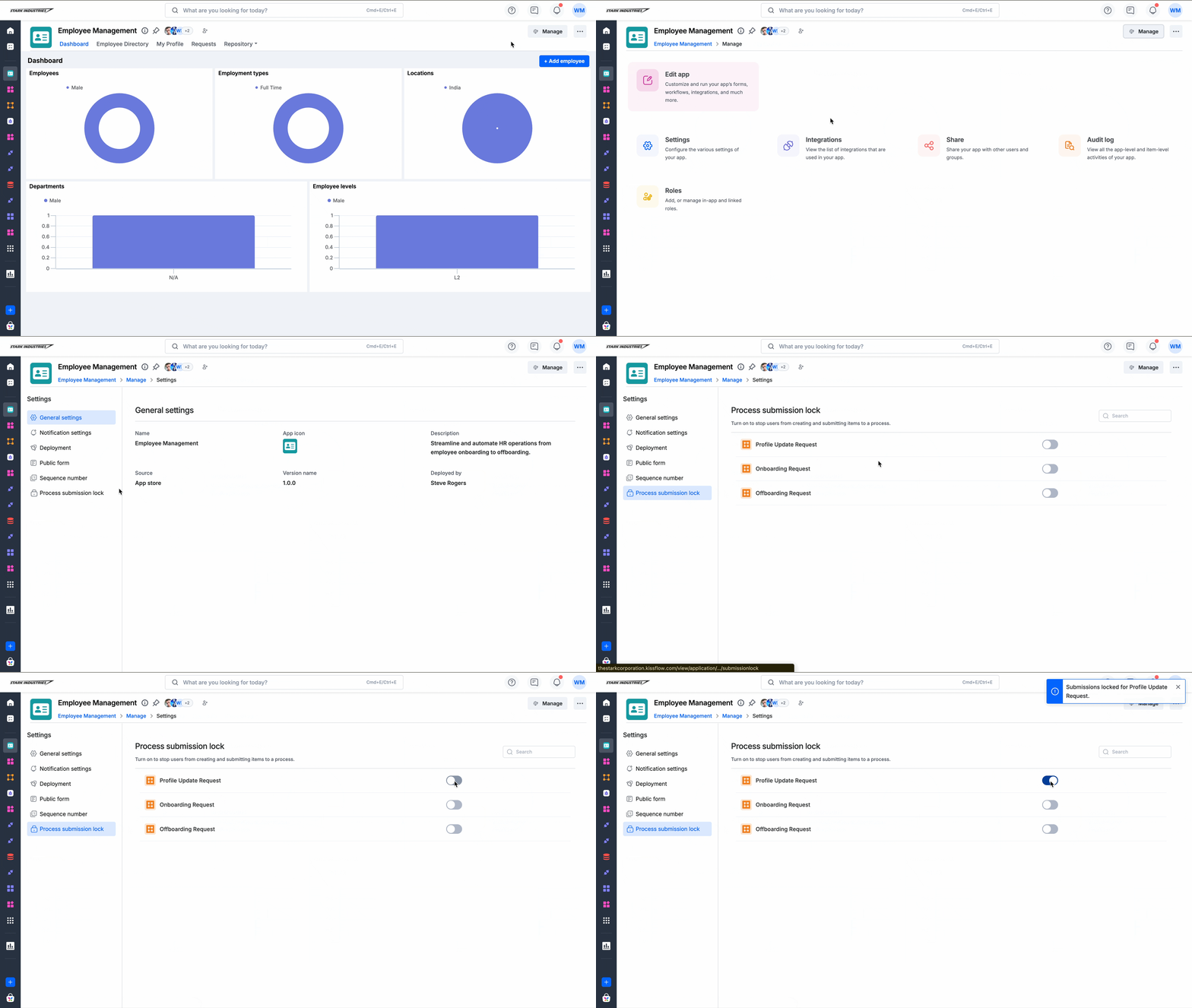
With this update, the configuration is now also accessible from the Manage page of an app: Manage > Settings > Process submission lock, where app administrators can lock or unlock any process instantly, without deploying the app again.
The setting remains available for individual processes in the app builder as well, so existing workflows are not affected.
What this means for you
Administrators can now lock or unlock a process at any time directly from an app's Manage > Settings, with changes taking effect immediately.
Changes made in Manage > Settings are reflected in the process' individual settings within the app builder, and vice versa.
The setting is environment-specific. Process submission locks applied in development, staging, or production environments are independent of one another and must be managed separately in each environment.
Check out the help documentation for more information. If you have any queries, please feel free to reach out to us!
Content aside
-
4
Likes
- 6 mths agoLast active
- 179Views
-
1
Following