
AI control center
Super admins can access AI settings for their Kissflow account using the AI Control Center. This feature allows administrators to enable or disable individual AI features. To access the AI Control Center, click your Profile icon > Account governance > AI control center.
Managing AI access
Turn on Account-wide AI access switch to activate AI services for your account and then begin to enable or disable specific AI features across Process, Board, Dataset, Apps and portals, Integrations, and Account.
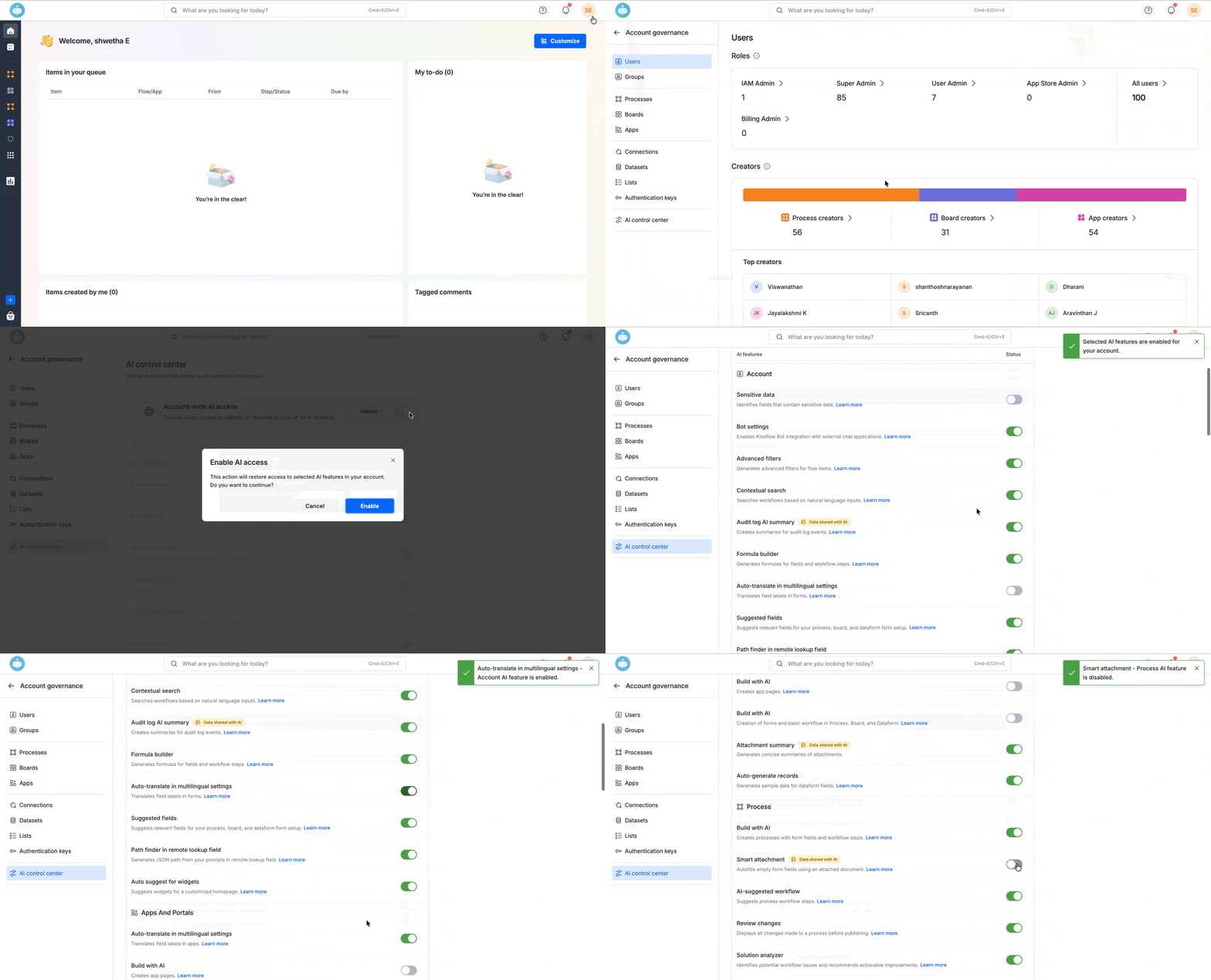
Note: When Account-wide AI access is switched back on, the previously configured settings for individual AI features will be restored.
Data shared with AI
The Data shared with AI tag indicates that the feature uses your account or transactional data as input to provide AI-powered functionality. When a feature has this tag, relevant data from your Kissflow account may be sent to the underlying AI model (Large Language Model) to generate responses, suggestions, or insights. This tag helps administrators clearly understand which AI features rely on account data to function.
You can consider controlling AI features listed on this page based on the following factors:
- Need of the AI feature for your account users.
- Enablement of features based on the Data shared with AI tag.
- Align usage with internal AI compliance policies.
Note: When account-wide AI access switch is inactive, all AI-powered features across your account will be unavailable to users.