
-
Export chart reports as PNG and PDF formats
Published on 18 May 2026 Whether you're sharing operational metrics, project insights, or analytics data, you no longer need to take screenshots. You can now export chart reports used in processes,…
-
Table enhancements: Search, sort, row height, and more!
Following our recent mobile release, we are excited to bring the same powerful table management tools to your web forms. Navigating large tables in your browser just got faster, cleaner,…
-
Now live: Scheduled Analytics reports
Published on 24 Apr 2026 We know that data is most powerful when it’s in the right hands at the right time. To help you stay on top of your KPIs without the hassle of manual exports,…
-
Introducing the calendarDays function!
Published on 21 Apr 2026 We are excited to introduce calendarDays, a powerful new addition to our formula builder. While dateDiff calculates the standard duration between two dates,…
-
Introducing Portal governance and widget insights for apps and portals
Published on 21 Apr 2026 We’re excited to roll out portal governance, a powerful new addition to your account governance module, giving you greater visibility over your portals within Kissflow.…
-
✨ Launched now: A fresh look for Kissflow!
Published on 10 Apr 2026 We're absolutely thrilled to unveil a modernization of Kissflow's interface! We've poured our hearts into refining your workspace to make your experience feel smoother,…
-
Breaking the barrier: Reference section fields while configuring table conditions
Published on 02 Apr 2026 If you’ve ever felt like your Kissflow tables’ conditions were on a deserted island, they no more are. We’re officially removing the barriers between your section and your…
-
New in Kissflow Apps: Process submission lock just got an upgrade
Published on 1 Apr 2026 Process submission lock allows administrators lock a process workflow. When the lock is enabled, users are unable to create new items or submit items in draft until the lock…
-
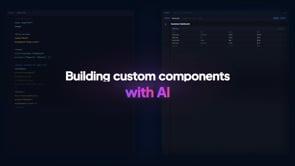
New in Kissflow Apps: Build custom page components with AI
Published on 24 Mar 2026 We are excited to announce that you can now build custom page components using AI in Kissflow Apps. Describe what you'd like to build,…
-
New in Kissflow Apps: Introducing the Repeater component
Published on 17 Mar 2026 We are thrilled to announce a new component in Kissflow Apps: Repeater. The Repeater is a powerful, configurable data display component that lets you design a layout…
-
New integration action: Add multiple rows to Google Sheets in one go
Published on 05 Mar 2026 Managing large amounts of data just got a whole lot faster! We’ve upgraded our Google Sheets connector with a highly requested action: Create rows in bulk.…
-
Your new favorite shortcut: The attachment summarizer
Published on 26 Feb 2026 We know the struggle: You are ready to approve a request, but first, you have to dig through a 30-page vendor quote to find the payment terms.…
-
New in Kissflow Apps: New variable types with updated limits
Published on 26 Feb 2026 What's new? We are thrilled to introduce three new variable types for JSON variables across apps: Object Array of objects Array of strings What has changed? In addition,…
-
New: Revamped slider fields in Kissflow forms
Published on 24 Feb 2026 Here’s a quick revamp to how users interact with the slider field in your forms. Previously, you had to drag the slider to find that sweet spot value.…
-
Now live: AI-assisted code generation for Run script connector
Published on 23 Feb 2026 While the Run script connector has always offered unmatched flexibility, we’re ensuring it’s accessible to everyone, regardless of their coding background.…

-
🚀 Contextual chat app notifications with item data
Published on 23 Jan 2026 Notification customization in Kissflow was available only for Email, Web app, and Push channels, where you could include relevant field data from the item to provide context.…
-
New in Kissflow Apps: Breadcrumb component
We are excited to introduce the Breadcrumb component, a secondary navigation tool designed for multi-layered applications. Whether you are managing deep data hierarchies, departmental structures,…
-
Just launched: Build pages faster with AI in Kissflow Apps
Building a fully functional page in Kissflow Apps often involves setting up layouts, workflows, reports, and access—steps that can quickly take more time than expected.…

-
Automate PDF print from a workflow item
Previously, you had to manually click Print inside each item and save the document as a PDF to generate a PDF from a process item. Automation was possible via integrations only to generate the PDF…
-
New mobile settings for image and attachment fields: Authenticity at every capture
Managing field operations, whether it’s site inspection, delivery confirmation, or safety audit, requires trust. You need to know that the images submitted by your team are current, authentic,…
-
🚀 Launched now: Mention anyone in process comments
Process assignees were able to mention only item initiators and previous-step assignees (participants) in comments. To involve a non-process user, you typically had to switch to chat or other…
-
🚀 Just released: Smart dashboards for processes and boards
We’re super thrilled to introduce brand-new AI-powered dashboards designed to personalize your processes and boards. These dashboards give both team managers and individual users a clearer view of…
-
Introducing the revamped Remote lookup field
Whether you are fetching live exchange rates, validating vendor IDs, or pulling customer details from a CRM, you need a tool that is fast, visible, and reliable.…
-
New: Take full control of your notification emails with custom SMTP server
We are excited to announce a powerful new addition to your Kissflow notification settings! You can now move beyond Kissflow's default email server and configure your custom SMTP server.…
-
Three new ways to manage your tables in Kissflow forms
Managing large tables on mobile devices just got a lot easier. We know that navigating tables in your forms can be tricky on smaller screens. We’re excited to roll out a set of enhancements for our…
Content aside
Category actions
Quick links
Categories
-
- Pre-release notes
-
- Export chart reports as PNG and PDF formats
- Table enhancements: Search, sort, row height, and more!
- Now live: Scheduled Analytics reports
- Introducing the calendarDays function!
- Introducing Portal governance and widget insights for apps and portals
- ✨ Launched now: A fresh look for Kissflow!
- Breaking the barrier: Reference section fields while configuring table conditions
- New in Kissflow Apps: Process submission lock just got an upgrade
- New in Kissflow Apps: Build custom page components with AI
- New in Kissflow Apps: Introducing the Repeater component
- New integration action: Add multiple rows to Google Sheets in one go
- Your new favorite shortcut: The attachment summarizer
- New in Kissflow Apps: New variable types with updated limits
- New: Revamped slider fields in Kissflow forms
- Now live: AI-assisted code generation for Run script connector
- 🚀 Contextual chat app notifications with item data
- New in Kissflow Apps: Breadcrumb component
- Just launched: Build pages faster with AI in Kissflow Apps
- Automate PDF print from a workflow item
- New mobile settings for image and attachment fields: Authenticity at every capture
- 🚀 Launched now: Mention anyone in process comments
- 🚀 Just released: Smart dashboards for processes and boards
- Introducing the revamped Remote lookup field
- New: Take full control of your notification emails with custom SMTP server
- Three new ways to manage your tables in Kissflow forms
- Kissflow roadmap
- Tips and tricks